
Activity & Issues
Activity & Issues is the first place you should open when Control Center reports a problem.
The panel helps answer two simple questions:
- which area currently has a problem,
- what details should be sent to support if you cannot resolve it yourself.
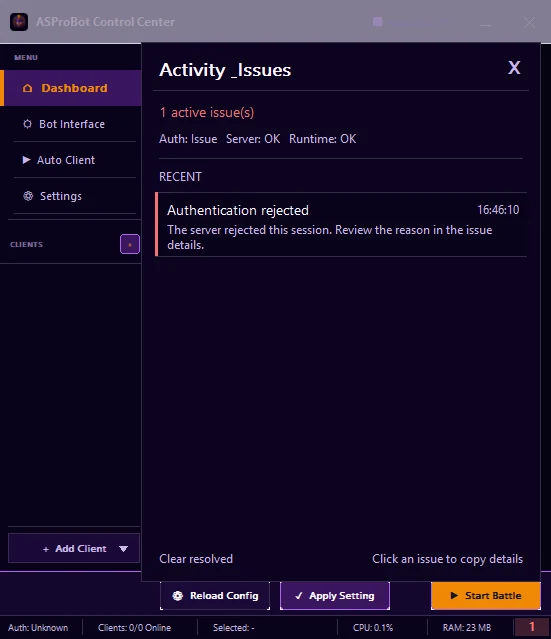
Status summary
At the top of the panel you can see a summary such as:
- Auth: OK / Issue
- Server: OK / Issue
- Runtime: OK / Issue
Use this summary to identify the affected area quickly.
The example image shows Auth: Issue while Server: OK and Runtime: OK, so the first troubleshooting step should focus on the Authentication issue listed below.
Check an issue
- Open Activity & Issues.
- Check the Auth / Server / Runtime summary.
- Find the active issue under Recent.
- Read the title and user-facing message.
- Click the issue when you want to copy its details to the clipboard.
The bottom of the panel shows Click an issue to copy details, so you do not need to search for log files during the first troubleshooting step.
Example: Authentication rejected
If Authentication rejected appears, the server rejected the current session.
What to do:
- click the issue to copy its details,
- read the message that is shown,
- if the reason is still unclear, send the copied details to support.
Do not send only a screenshot when issue details can be copied. The copied diagnostic information is usually more useful.
Severity
| Severity | Meaning |
|---|---|
| Info | Information, usually no action is required. |
| Warning | A condition needs attention. |
| Error | A function failed or is not working normally. |
| Critical | An important problem that should be checked immediately. |
Issue categories
Issues may come from areas such as:
- Authentication
- Server
- Network
- Runtime IPC
- Client
- Configuration
- Update
- Internal
You do not need to understand every technical term. For normal use, focus on the issue title and the message shown to you.
Send details to support
If you still need help:
- click the affected issue,
- the details are copied to the clipboard,
- paste them into your support message,
- add one sentence describing what you were doing before the problem appeared.
Example:
The problem appeared while using Add Client.
Here are the Activity & Issues details:

[paste details]
TIP
Do not edit the copied details. Error codes, category information, and Runtime details may be useful during troubleshooting.
Clear resolved
Use Clear resolved to remove issues that have already been resolved.
Do not clear an active issue before reviewing or copying it if you still need help.