
Battle
The Battle tab configures battle behavior for the currently selected client.
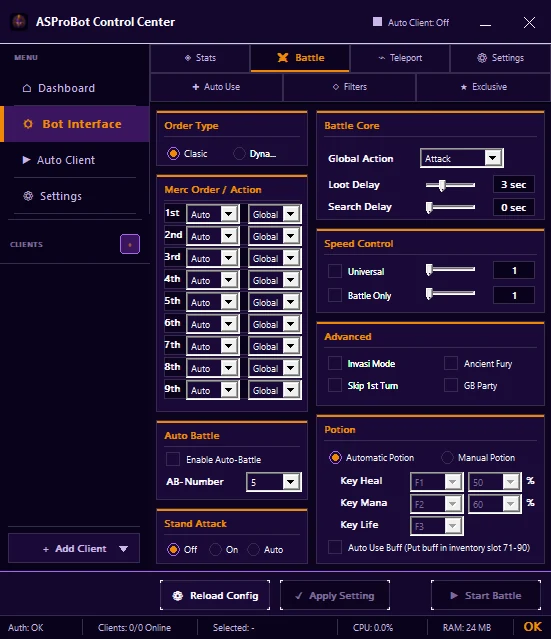
Main sections
Order Type / Action Type
Controls how the action order is interpreted. Control Center provides modes such as Classic and Dynamic.
Merc Order / Action
Defines actions for each character/mercenary position. An action set to Global follows Global Action.
Battle Core
Includes settings such as:
- Global Action
- Loot Delay
- Search Delay
Change values gradually so the result is easy to test.
Speed Control
Use this section for available speed options such as Universal or Battle Only.
Advanced
Contains additional modes or behaviors. Enable only what your configuration actually needs.
Auto Battle
Enable Enable Auto-Battle when Auto Battle is required, then verify AB-Number.
Stand Attack
Control Center provides Off, On, and Auto options for Stand Attack.
Potion is inside Battle
Control Center does not use a separate Potion tab. Potion settings are available near the bottom of Battle and may include:
- Automatic / Manual Potion,
- Heal / Mana / Life keys,
- percentage values,
- Auto Use Buff.
Apply changes
- Make sure the correct client is selected.
- Change only the settings you need.
- Click Apply Setting.
- Use Start Battle when you are ready to test the configuration.
TIP
When troubleshooting, change one group of settings at a time instead of changing delays, filters, potions, and Advanced options together.
If battle does not run as expected
Check:
- the selected client,
- whether the changes were applied,
- Order/Action and Global Action,
- Filters configuration,
- active issues in Control Center.
➡️ Filters
If you use ASProBot Launcher
The classic Launcher Battle interface has its own layout and guide.