Potions
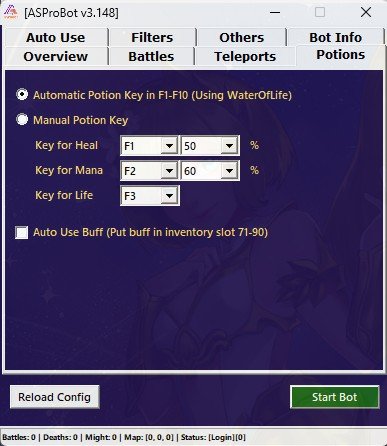
The Potions menu is used to configure automatic potion and buff usage.
This feature is important to help your character and mercenaries survive longer during farming or battle. For new users, potion settings should be configured before running full battle automation.
What Potions Is Used For
From the Potions menu, you can configure:
- Automatic HP potion usage
- Automatic MP potion usage
- Potion hotkeys
- HP and MP percentage thresholds
- Automatic buff usage from inventory
TIP
If your character often dies while farming, check the potion settings first before changing battle settings.
Automatic Mode
Automatic mode uses hotkeys F1 to F10 for automatic potion usage.
In this mode, the bot will use potions based on the configured HP or MP percentage.
Example:
HP <= 50% → use HP potion
MP <= 30% → use MP potion
This mode is suitable for users who want a simple and quick setup.
Manual Mode
Manual mode allows you to choose the potion hotkey and usage percentage manually.
Use this mode if you want more specific control.
Example:
HP Potion Key = F1
HP Percent = 60%

MP Potion Key = F2
MP Percent = 35%
This means:
- If HP reaches 60% or lower, the bot will press F1.
- If MP reaches 35% or lower, the bot will press F2.
NOTE
Make sure the potion is placed on the correct hotkey in the game.
HP Potion Settings
HP Potion is used to keep your character or mercenaries from dying easily.
Recommended starting range:
HP Percent = 50% - 70%Use a higher value if:
- The farming area is dangerous
- Monsters deal high damage
- Your character is still weak
- You farm for long periods
Use a lower value if:
- Your character is strong
- The farming area is safe
- You want to save potions
MP Potion Settings
MP Potion is used so your character or mercenaries can continue using skills.
Recommended starting range:
MP Percent = 30% - 50%Use a higher value if you often use skills.
Use a lower value if you mostly use normal attacks.
Auto Use Buff
Auto Use Buff is used to automatically use buffs from inventory.
Buff items are usually placed in specific inventory slots based on the bot settings.
This feature is useful for:
- Attack buffs
- Defense buffs
- EXP buffs
- Farming support items
- Other buffs that need to be reused
IMPORTANT
Make sure the buff item is placed in the inventory slot that matches the bot configuration.
Potion Usage Tips
For more stable results:
- Make sure you have enough potions.
- Place potions on the correct hotkeys.
- Do not set the HP threshold too low in dangerous areas.
- Test potion settings before long farming sessions.
- Recheck the settings if your character often dies or runs out of MP.
Common Issues
Potion Is Not Used
If potions are not being used, check the following:
- Potions are available in inventory or hotkeys.
- The hotkey is configured correctly.
- HP/MP percentage is configured properly.
- The bot is active.
- The game is not lagging or delayed.
Character Still Dies
If the character still dies even when potions are enabled:
- Increase the HP potion threshold.
- Use a safer farming area.
- Check whether potions have run out.
- Check whether potion usage delay is too slow.
- Check battle settings so the bot is not too aggressive.
MP Still Runs Out
If MP still runs out:
- Increase the MP potion threshold.
- Make sure MP potions are available.
- Reduce excessive skill usage.
- Check Merc Action settings.
Recommended Setup for New Users
For initial usage, start with simple values:
HP Potion = 60%
MP Potion = 40%
Once the bot runs smoothly, adjust the values based on your character and farming area.
TIP
It is safer to use a slightly higher HP threshold than setting it too low, especially when testing a new farming area.
Next Step
After configuring Potions, continue to farming location and automatic teleport settings.
➡️ Teleports